Secure mobile app telemetry through a server proxy
Mobile applications are distributed to devices you do not control. Anything compiled into a React Native bundle, Swift app, Kotlin app, or Flutter binary can eventually be inspected. Do not ship a Telemetry API key in the app, a remote-config value delivered to the app, or a client-readable environment file.
Instead, send a small event to an authenticated endpoint owned by your application. That endpoint validates a fixed contract, adds trusted server context, and forwards the event with a server-side key.
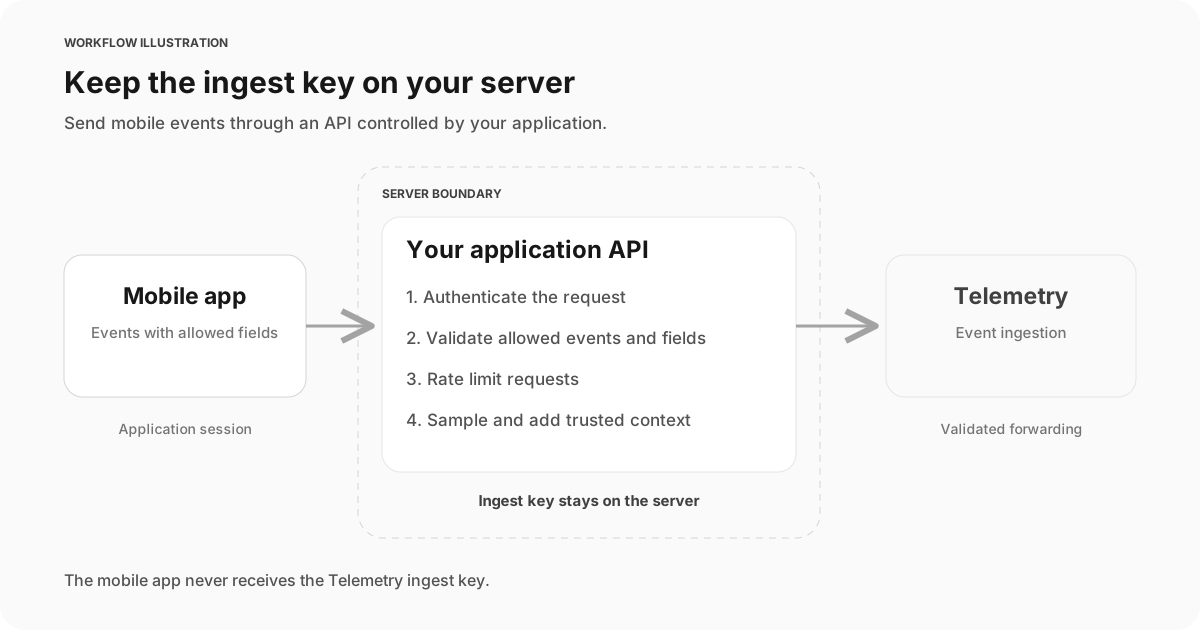
The mobile app never receives the Telemetry ingestion key. Your API owns authentication, validation, sampling, and forwarding.
When this pattern fits
Use a mobile proxy for product milestones, bounded performance measurements, sync outcomes, controlled error categories, and release-quality signals. Examples include:
mobile_sync_completedafter a local-to-server sync reaches a terminal outcome.mobile_screen_readyfor a small set of named screens and a measured duration.mobile_purchase_flow_completedafter the server confirms the durable outcome.mobile_api_request_completedfor sampled, categorized dependency results.
This is not a replacement for crash symbolication, device logs, distributed traces, or an exact audit ledger. Mobile delivery is affected by connectivity, background execution limits, app termination, consent, and client clock quality. Keep specialist diagnostics in their specialist systems and send only the outcome needed for SQL analysis.
Define the client contract
The client should choose from a versioned list of event names and fields. It should not choose a Telemetry table name, send arbitrary property bags, or forward exception messages.
{
  "event_name": "mobile_sync_completed",
  "event_version": 1,
  "event_id": "0196f37e-6e83-7b75-9d04-6b8283b35f74",
  "occurred_at": "2026-07-30T18:42:11.150Z",
  "status": "success",
  "duration_ms": 842,
  "item_count": 12,
  "network_type": "wifi"
}
Keep dimensions bounded. Prefer a controlled screen_name over a raw route, an error_type enum over an exception string, and a coarse network_type over network identifiers. Do not include access tokens, device advertising identifiers, contact data, message contents, file paths, clipboard data, free-form search text, or raw URLs.
event_id lets your application recognize retries; this example does not deduplicate them, and Telemetry does not promise exactly-once delivery. occurred_at records the client observation, but the proxy should also add a server-received timestamp. Use the server timestamp for freshness and ingestion monitoring because a device clock can be wrong.
Implement the application-owned endpoint
The server-only factory below validates one client-reported sync observation and forwards it with the Log API. Register the returned handler in your own application. Supply authenticate from your verified application session, allowRequest from your account/session rate limiter with a global ceiling, apiKey from server configuration, and a fixed environment. The factory does not implement your authentication, consent, rate-limit store or server body-read deadline. Never pass the key to mobile code.
type Actor = {
  accountId: string;
  deviceSessionId: string;
  platform: "ios" | "android";
  appVersion: string;
};
type Dependencies = {
  authenticate: (request: Request) => Promise<Actor | null>;
  allowRequest: (actor: Actor) => Promise<boolean>;
  apiKey: string;
  environment: "production" | "staging" | "development";
  diagnostic?: () => void;
};
const fields = new Set([
  "event_name", "event_version", "event_id", "occurred_at",
  "status", "duration_ms", "item_count", "network_type",
]);
const statuses = new Set(["success", "failed", "cancelled"]);
const networks = new Set(["wifi", "cellular", "ethernet", "offline", "unknown"]);

async function readBoundedJson(request: Request) {
  if (!request.body) return { ok: false as const, status: 400 };
  const reader = request.body.getReader();
  const chunks: Uint8Array[] = [];
  let bytes = 0;
  try {
    while (true) {
      const { done, value } = await reader.read();
      if (done) break;
      bytes += value.byteLength;
      if (bytes > 4096) {
        void reader.cancel().catch(() => {});
        return { ok: false as const, status: 413 };
      }
      chunks.push(value);
    }
    const joined = new Uint8Array(bytes);
    let offset = 0;
    for (const chunk of chunks) {
      joined.set(chunk, offset);
      offset += chunk.byteLength;
    }
    const text = new TextDecoder("utf-8", { fatal: true }).decode(joined);
    return { ok: true as const, value: JSON.parse(text) as unknown };
  } catch {
    return { ok: false as const, status: 400 };
  } finally {
    reader.releaseLock();
  }
}
function integerBetween(value: unknown, maximum: number): value is number {
  return typeof value === "number" && Number.isInteger(value) && value >= 0 && value <= maximum;
}
function boundedText(value: unknown, maximum: number): value is string {
  return typeof value === "string" && value.length > 0 && value.length <= maximum;
}
function clientTimestamp(value: unknown, receivedAt: number) {
  if (typeof value !== "string" || !/^\d{4}-\d{2}-\d{2}T\d{2}:\d{2}:\d{2}\.\d{3}Z$/.test(value)) return false;
  const parsed = Date.parse(value);
  return Number.isFinite(parsed) && new Date(parsed).toISOString() === value &&
    parsed >= receivedAt - 86_400_000 && parsed <= receivedAt + 300_000;
}

export function createMobileTelemetryHandler(deps: Dependencies) {
  return async function postMobileTelemetry(request: Request) {
    const reportFailure = () => { try { deps.diagnostic?.(); } catch {} };
    try {
      if (request.method !== "POST") return new Response(null, { status: 405, headers: { Allow: "POST" } });
      const actor = await deps.authenticate(request);
      if (!actor) return new Response("unauthorized", { status: 401 });
      const type = request.headers.get("content-type")?.split(";")[0].trim().toLowerCase();
      if (type !== "application/json") return new Response("unsupported content type", { status: 415 });
      if (!(await deps.allowRequest(actor))) return new Response("rate limited", { status: 429 });
      const parsed = await readBoundedJson(request);
      if (!parsed.ok) return new Response("invalid body", { status: parsed.status });
      const input = parsed.value;
      if (input === null || typeof input !== "object" || Array.isArray(input)) {
        return new Response("invalid event", { status: 422 });
      }
      const body = input as Record<string, unknown>;
      const receivedAt = Date.now();
      if (
        Object.keys(body).some(key => !fields.has(key)) ||
        body.event_name !== "mobile_sync_completed" || body.event_version !== 1 ||
        typeof body.event_id !== "string" || !/^[0-9a-f]{8}-[0-9a-f]{4}-[1-8][0-9a-f]{3}-[89ab][0-9a-f]{3}-[0-9a-f]{12}$/i.test(body.event_id) ||
        !clientTimestamp(body.occurred_at, receivedAt) ||
        typeof body.status !== "string" || !statuses.has(body.status) ||
        !integerBetween(body.duration_ms, 300_000) || !integerBetween(body.item_count, 10_000) ||
        typeof body.network_type !== "string" || !networks.has(body.network_type)
      ) return new Response("invalid event", { status: 422 });
      if (
        !deps.apiKey || !boundedText(actor.accountId, 128) || !boundedText(actor.deviceSessionId, 128) ||
        !boundedText(actor.appVersion, 80) || !["ios", "android"].includes(actor.platform) ||
        !["production", "staging", "development"].includes(deps.environment)
      ) return new Response("collector unavailable", { status: 503 });
      const response = await fetch("https://api.telemetry.sh/log", {
        method: "POST",
        headers: { "Content-Type": "application/json", Authorization: `Bearer ${deps.apiKey}` },
        signal: AbortSignal.timeout(1000),
        body: JSON.stringify({ table: "mobile_sync_completed", data: {
          event_id: body.event_id, event_version: 1, occurred_at: body.occurred_at,
          received_at: new Date(receivedAt).toISOString(), status: body.status,
          duration_ms: body.duration_ms, item_count: body.item_count,
          network_type: body.network_type, account_id: actor.accountId,
          app_platform: actor.platform, app_version: actor.appVersion,
          environment: deps.environment,
        } }),
      });
      if (!response.ok) {
        void response.body?.cancel().catch(() => {});
        reportFailure();
        return new Response("collection unavailable", { status: 503 });
      }
      void response.body?.cancel().catch(() => {});
      return new Response(null, { status: 202 });
    } catch {
      reportFailure();
      return new Response("collection unavailable", { status: 503 });
    }
  };
}
The API fixes the table and checks actual stream bytes, JSON shape, unknown fields, enums, numbers and server context. occurred_at must be canonical UTC with milliseconds, at most 24 hours old or five minutes ahead of receive time; adjust that policy deliberately for your app. Device clocks and client-reported status can be wrong: this is an observation, not proof that backend data committed. Emit authoritative purchases or sync commits on the server.
A 202 means the upstream HTTP response was successful, not that storage, deduplication or query readback is proven. Export rejection, non-success HTTP status and diagnostic failure are contained in a 503 collection response. Send this request separately after the product action; do not let an analytics response change its outcome. The one-second AbortSignal is cooperative and covers forwarding, not a total deadline for auth, rate limiting or body reads. There is no durable queue or automatic retry.
Apply four server-side controls
Authenticate
Require the same signed application session or installation credential used by the rest of your API. CORS is not a mobile security boundary, and a custom header alone does not prove who sent a request.
Allowlist
Reject unknown event names, fields, enum values, oversized strings, invalid numbers, future timestamps, and bodies above a small size limit. The allowlist is both a privacy control and a cardinality control.
Rate limit
Limit by authenticated account and an appropriate installation or session identifier. Also impose a global ceiling. Return a normal application error without retrying indefinitely when a client exceeds the limit.
Add trusted context
The proxy should add the account identifier, server receive time, environment, and verified application version when those values are available. If an account identifier is sensitive in your context, pseudonymize it consistently before collection and document who can reverse the mapping.
Choose the mobile delivery behavior
For React Native and Flutter, use the platform HTTP client already responsible for authenticated API requests. For native iOS and Android, use the same URLSession or HTTP stack used by the app. The endpoint and event contract should remain identical across platforms.
Keep a small bounded queue when offline delivery matters. Cap both the item count and age, discard events that have exceeded the documented window, and use exponential backoff with jitter. Do not let analytics retries delay the product action. Preserve the same event_id across attempts so the server can deduplicate.
Some outcomes are better emitted by the server. A purchase, subscription change, access-policy decision, or completed import becomes authoritative only after the backend commits it. Let the server emit those outcomes directly instead of trusting a client assertion.
Query and verify the result
First test success, failure, cancellation, invalid/oversized payloads, unauthenticated requests, rate limits, upstream failures and duplicate IDs offline with a captured transport. Do not put invented success rows in mobile_sync_completed; isolated ingestion fixtures belong in telemetry_quickstart.
For the real integration check, perform one consented sync in your own application, retain its event_id, and query its actual observation. Replace the ID below with that real ID; a fictional fixture or client status alone is not an integration or durable business result:
SELECT
  received_at,
  event_id,
  app_platform,
  app_version,
  status,
  duration_ms,
  item_count
FROM mobile_sync_completed
WHERE event_id = 'your-real-observed-event-id'
ORDER BY received_at DESC
LIMIT 50;
Before rollout, verify:
- The shipped application binary and JavaScript bundle contain no Telemetry API key.
- Unknown events and fields are rejected rather than silently forwarded.
- Raw exception text, URLs, user input, credentials, and device identifiers are absent.
- Retries keep one
event_id. The factory permits duplicates; review conflicting duplicate payloads and use application-owned deduplication before computing outcome counts. - Dashboards display sample count beside rates and percentiles.
- Consent, retention, deletion, and account-removal behavior match the application policy.
Failure modes to plan for
Treat the proxy as best-effort observability unless the event is part of a separately designed durable business workflow. A Telemetry timeout should normally be logged and bounded without failing the mobile product action. Monitor proxy rejection rate, forwarding failures, queue age, and event freshness so a silent instrumentation break does not look like a product-usage drop.
Do not automatically accept arbitrary client events to "make debugging easier." The endpoint would then accept fields your team has not reviewed. Add a new versioned field or event only after reviewing its purpose, type, cardinality, privacy classification, and deletion requirements.