Measuring conversion rates with SQL
An overall conversion rate tells you the result. Milestone events explain it by showing where users leave the funnel and which segment changed.
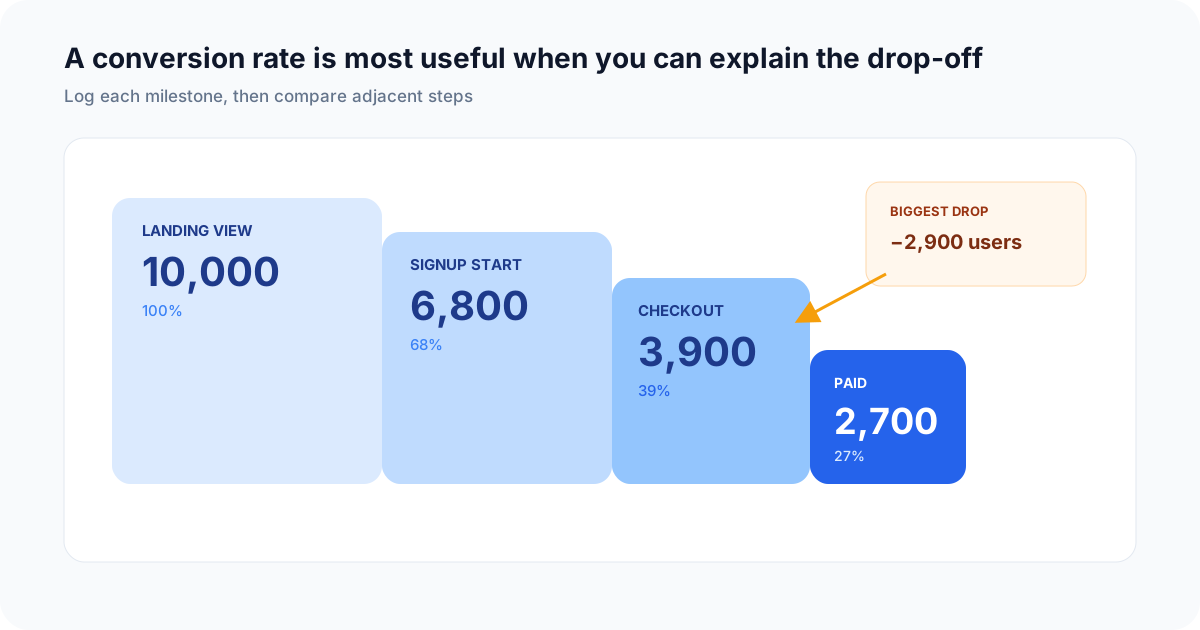
Adjacent-step conversion rates make the largest drop-off immediately visible.
This guide builds a user-level signup funnel in one event table and one SQL query. Counting distinct users at each stage avoids inflating conversion when one person repeats an action.
1. Define the funnel before adding events
Use milestones that represent completed outcomes, not button clicks that may fail:
signup_completedworkspace_createdfirst_event_receiveddashboard_created
Choose one stable subject identifier such as user_id or team_id. The denominator and every later stage must use the same subject.
2. Log a consistent event shape
npm install telemetry-sh
import telemetry from "telemetry-sh";

telemetry.init(process.env.TELEMETRY_API_KEY);

await telemetry.log("product_events", {
  event_name: "signup_completed",
  user_id: user.id,
  team_id: team.id,
  acquisition_channel: "docs",
  plan: "free",
});
Log later milestones to the same product_events table with the same identifiers and segmentation fields:
await telemetry.log("product_events", {
  event_name: "first_event_received",
  user_id: user.id,
  team_id: team.id,
  acquisition_channel: user.acquisitionChannel,
  plan: team.plan,
});
Telemetry adds timestamp_utc automatically. Avoid logging emails, names, cookies, or raw request content when a stable internal identifier is sufficient.
3. Calculate the funnel in one query
The query below assigns one row per user, records whether each stage happened, and then calculates counts and conversion from the original signup cohort.
WITH user_funnel AS (
  SELECT
    user_id,
    MIN(CASE WHEN event_name = 'signup_completed' THEN timestamp_utc END)
      AS signed_up_at,
    MIN(CASE WHEN event_name = 'workspace_created' THEN timestamp_utc END)
      AS workspace_created_at,
    MIN(CASE WHEN event_name = 'first_event_received' THEN timestamp_utc END)
      AS first_event_at,
    MIN(CASE WHEN event_name = 'dashboard_created' THEN timestamp_utc END)
      AS dashboard_created_at
  FROM product_events
  WHERE timestamp_utc >= now() - INTERVAL '30 days'
    AND event_name IN (
      'signup_completed',
      'workspace_created',
      'first_event_received',
      'dashboard_created'
    )
  GROUP BY user_id
),
stage_counts AS (
  SELECT 1 AS step, 'Signed up' AS stage, COUNT(*) AS users
  FROM user_funnel
  WHERE signed_up_at IS NOT NULL

  UNION ALL

  SELECT 2, 'Created workspace', COUNT(*)
  FROM user_funnel
  WHERE workspace_created_at >= signed_up_at

  UNION ALL

  SELECT 3, 'Sent first event', COUNT(*)
  FROM user_funnel
  WHERE first_event_at >= workspace_created_at

  UNION ALL

  SELECT 4, 'Created dashboard', COUNT(*)
  FROM user_funnel
  WHERE dashboard_created_at >= first_event_at
)
SELECT
  step,
  stage,
  users,
  ROUND(
    100.0 * users /
    NULLIF(MAX(CASE WHEN step = 1 THEN users END) OVER (), 0),
    2
  ) AS conversion_from_signup_pct,
  ROUND(
    100.0 * users /
    NULLIF(LAG(users) OVER (ORDER BY step), 0),
    2
  ) AS conversion_from_previous_pct
FROM stage_counts
ORDER BY step;
The first stage has no previous-stage rate, so conversion_from_previous_pct is null for that row. Every later row shows both total conversion from signup and adjacent-step conversion.
4. Segment without changing the definition
To compare acquisition channels or plans, preserve the field on the signup event, add it to user_funnel, and group the stage counts by that field. Do not silently switch the denominator from users to events.
Useful segment checks include:
- acquisition channel;
- initial plan or offer;
- device or application surface;
- signup week;
- experiment assignment recorded before the outcome.
Avoid high-cardinality dimensions until the unsplit funnel is trustworthy.
5. Visualize and validate the result
Use a horizontal bar chart for users ordered by step, and display both rate columns in a result table. Before sharing the chart, inspect:
- users completing a later stage before an earlier timestamp;
- missing or reused identifiers;
- internal, test, and bot accounts;
- events that arrived late;
- users whose signup occurred before the selected window;
- whether the newest cohort has had enough time to convert.
A funnel is a cohort measurement, not simply two independent event counts. For longer conversion windows, cohort users by signup date and allow a fixed observation period.
Next steps
Open the complete signup activation funnel SQL recipe for an example result and visualization. Use weekly cohort retention once activation is defined, then compare feature adoption before upgrade.