イベントスキーマ
クエリが期待するフィールド
| フィールド | 種類 | なぜ存在するのか |
|---|---|---|
| timestamp_utc | Timestamp | 製品イベントが発生したとき。 |
| user_id | Utf8 | 安定したユーザー識別子。 |
| event_name | Utf8 | 安定した snake_case マイルストーン名。 |
| source | Utf8 | 取得またはキャンペーンのソース。 |
DataFusion SQL
クエリをコピーする
sql
WITH events AS (
  SELECT user_id, event_name, timestamp_utc
  FROM product_events
  WHERE timestamp_utc >= now() - INTERVAL '30 days'
),
signups AS (
  SELECT user_id, MIN(timestamp_utc) AS signed_up_at
  FROM events WHERE event_name = 'signup_completed'
  GROUP BY user_id
),
onboarding AS (
  SELECT s.user_id, s.signed_up_at, MIN(e.timestamp_utc) AS onboarded_at
  FROM signups AS s
  LEFT JOIN events AS e ON e.user_id = s.user_id
    AND e.event_name = 'onboarding_completed'
    AND e.timestamp_utc >= s.signed_up_at
  GROUP BY s.user_id, s.signed_up_at
),
integrations AS (
  SELECT o.user_id, o.signed_up_at, o.onboarded_at,
    MIN(e.timestamp_utc) AS integrated_at
  FROM onboarding AS o
  LEFT JOIN events AS e ON e.user_id = o.user_id
    AND e.event_name = 'integration_connected'
    AND e.timestamp_utc >= o.onboarded_at
  GROUP BY o.user_id, o.signed_up_at, o.onboarded_at
),
user_funnel AS (
  SELECT i.user_id, i.signed_up_at, i.onboarded_at, i.integrated_at,
    MIN(e.timestamp_utc) AS activated_at
  FROM integrations AS i
  LEFT JOIN events AS e ON e.user_id = i.user_id
    AND e.event_name = 'first_value_completed'
    AND e.timestamp_utc >= i.integrated_at
  GROUP BY i.user_id, i.signed_up_at, i.onboarded_at, i.integrated_at
),
stage_counts AS (
  SELECT 1 AS step_order, 'Signed up' AS step, COUNT(signed_up_at) AS users
  FROM user_funnel
  UNION ALL
  SELECT 2, 'Onboarded', COUNT(onboarded_at) FROM user_funnel
  UNION ALL
  SELECT 3, 'Integrated', COUNT(integrated_at) FROM user_funnel
  UNION ALL
  SELECT 4, 'Activated', COUNT(activated_at) FROM user_funnel
)
SELECT
  step_order,
  step,
  users,
  100.0 * users
    / NULLIF(MAX(CASE WHEN step_order = 1 THEN users END) OVER (), 0)
    AS conversion_from_signup_pct,
  100.0 * users
    / NULLIF(LAG(users) OVER (ORDER BY step_order), 0)
    AS conversion_from_previous_pct
FROM stage_counts
ORDER BY step_order;
この読み取り専用クエリは、空の型付きテーブルに対して計画され、実行されます。 アパッチ DataFusion 45.2.0。決定論的なサンプル出力は合成され、個別にレビューされます。フィールド タイプ、しきい値、ビジネス定義を独自のデータと照合して検証します。 テスト方法を読んでください。
クエリ結果
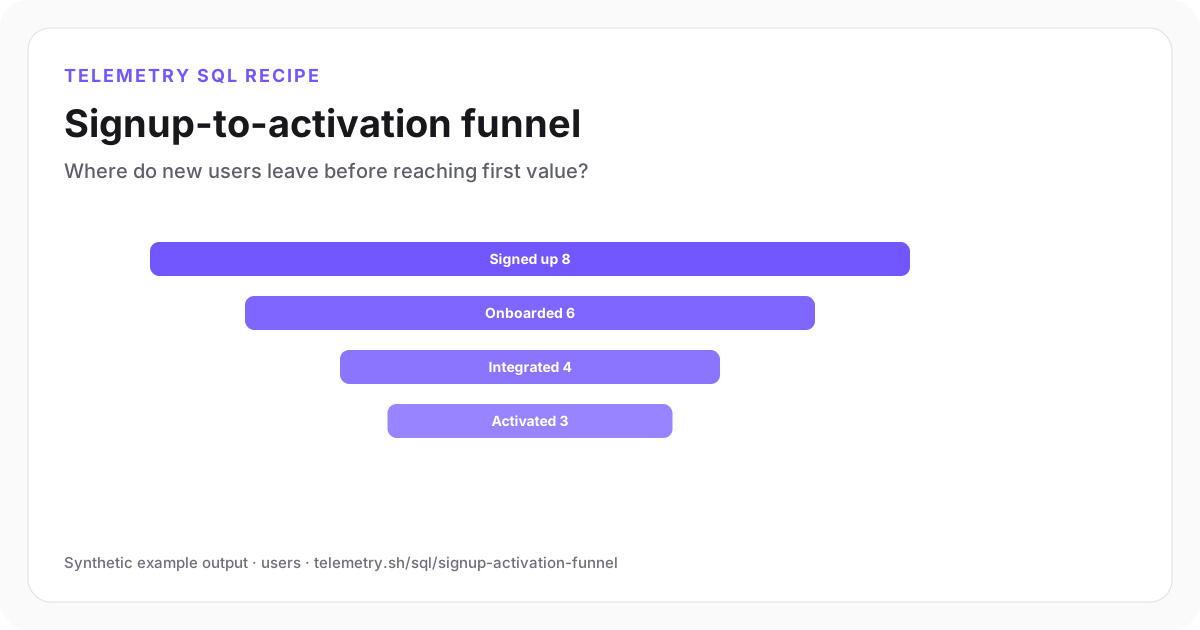
サインアップからアクティベーションまでのファネル
最大の絶対損失はオンボーディング完了前に発生しますが、統合が後になっても依然として最も強力なボトルネックとなります。
Signed up8
Onboarded6
Integrated4
Activated3
| step_order | step | users | conversion_from_signup_pct | conversion_from_previous_pct |
|---|---|---|---|---|
| 1 | Signed up | 8 | 100 | — |
| 2 | Onboarded | 6 | 75 | 75 |
| 3 | Integrated | 4 | 50 | 66.67 |
| 4 | Activated | 3 | 37.5 | 75 |
合成出力例。運用上の決定に使用する前に、独自のイベント スキーマとしきい値に対してクエリを実行します。
例を再現する
サンプルデータをダウンロードする
JSON バンドルには、型付きイベント コントラクトが含まれています。 reproducible 入力行、正確な SQL、予想される出力、レビューメモ、およびエンジンのバージョン。 CSV には、表示された結果が含まれます。
SQL の仕組み
- 1Each CTE selects the first milestone at or after the previous eligible stage, retaining one row per signed-up user.
- 2A missing or out-of-order milestone blocks all later steps. A later valid retry can advance the user, and duplicates count once.
- 3このクエリでは、サインアップからのコンバージョンと前のステップからのコンバージョンの両方がレポートされるため、全体的なパフォーマンスと最大の移行損失が同時に表示されます。
- 4イベント名は、ユーザーがステップを達成したことを証明しないページビューやボタンのクリックではなく、完了したマイルストーンを表す必要があります。
確認するエッジケース
- サインアップ時間に基づいてコホート ウィンドウを使用し、最近のサインアップがアクティブになるまで十分な時間を確保します。
- 遅れて到着するイベントにより、ユーザーが最近計算された目標到達プロセス内で一時的に後方に移動する可能性があります。
- 合計ファネルが十分なボリュームになった後でのみ、取得ソースごとにセグメント化します。
推奨されるダッシュボード
- ファネルバー: ユーザーごとのステップ
- 折れ線グラフ: 登録週ごとのアクティベーション率
- 表: ソース、プラン、またはペルソナ別のコンバージョン
このクエリに必要なイベントを設定する
関連する機器とガイド
ソースデータを定義する
この分析のイベント スキーマ
分析を続ける
自分のイベントで実行する
テーブルを作成し、フィールドを調整して、結果を保存します
無料で始めて、構造化されたイベントを送信し、クエリ結果をグラフ、共有ダッシュボード ウィジェット、またはアラート入力として使用します。