分析網路伺服器錯誤
錯誤計數表明出現了問題。結構化上下文(路由、狀態程式碼、發布和請求 ID)可幫助您識別出現問題的內容並將其與部署關聯起來。
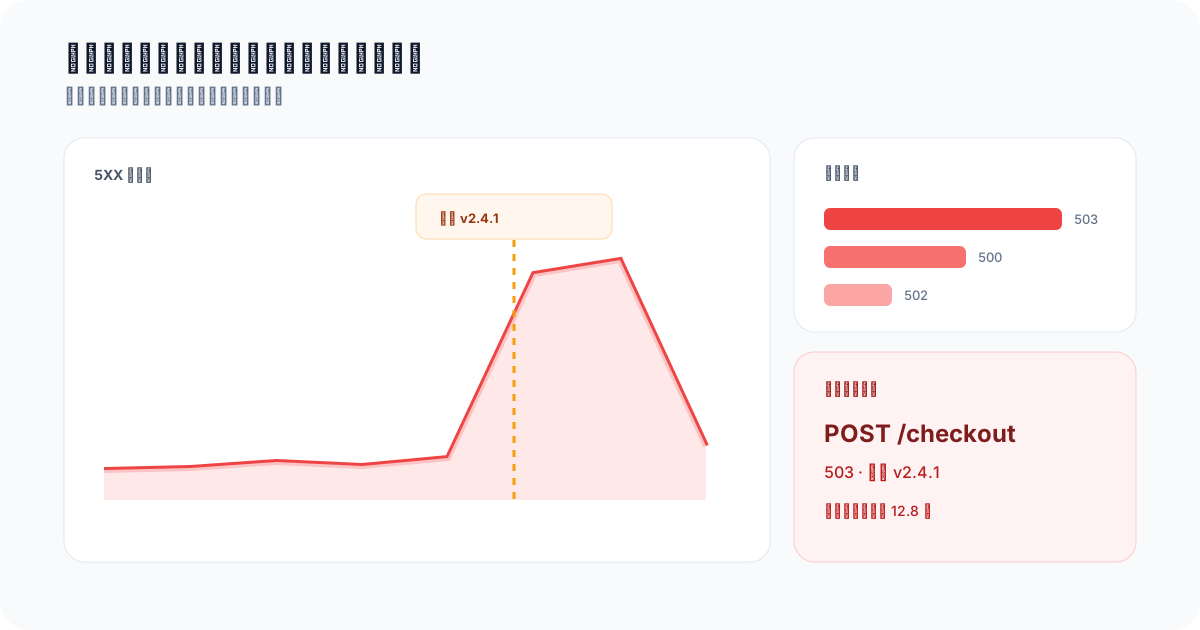
最有用的錯誤事件會保留事件期間所需的維度。
在現代 Web 開發中,監控和記錄是維護健壯且可靠的應用程式的關鍵方面。 Telemetry 允許開發人員追蹤各種事件和系統指標,這對於除錯和改善使用者體驗至關重要。在這篇文章中,我們將探討如何使用 Telemetry API 捕獲並記錄 Express.js Web 伺服器中的所有錯誤。雖然本指南僅涵蓋 Express,但這些想法適用於所有 Web 伺服器,從 Rails 到 Elixir 等。
設定Telemetry
在記錄任何資料之前,我們需要設定 Telemetry。在此範例中,我們將使用 Telemetry JavaScript SDK。
首先,在您的專案中安裝 Telemetry SDK:
npm install telemetry-sh
然後,使用 API 金鑰在應用程式中初始化 Telemetry 客戶端:
import telemetry from "telemetry-sh";

telemetry.init("YOUR_API_KEY");
建立 Express 應用程式
接下來,讓我們設定一個基本的 Express 應用程式。如果您尚未安裝 Express,可以使用以下命令將其新增到您的專案中:
npm install express
現在,建立一個簡單的 Express 伺服器:
const express = require('express');
const app = express();
const port = 3000;

app.get('/', (req, res) => {
  res.send('Hello World!');
});

app.listen(port, () => {
  console.log(`Example app listening at http://localhost:${port}`);
});
新增結構化錯誤中介軟體
錯誤處理程式屬於所有路由之後。捕獲安全類別和操作上下文,而不是可能包含私有值的原始主體、憑據、堆疊追蹤或異常訊息。
const express = require("express");
const telemetry = require("telemetry-sh");

telemetry.init(process.env.TELEMETRY_API_KEY);

const app = express();

app.get("/api/projects/:id", async (req, res) => {
  throw Object.assign(new Error("Synthetic failure"), {
    code: "PROJECT_LOOKUP_FAILED",
  });
});

app.use(async (err, req, res, next) => {
  const statusCode = Number(err.statusCode) || 500;

  await telemetry.log("api_request_failed", {
    route_template: req.route?.path ?? "unmatched_route",
    method: req.method,
    status_code: statusCode,
    status: "error",
    error_type: err.constructor?.name ?? "Error",
    error_code: err.code ?? "UNCLASSIFIED_ERROR",
    request_id: req.get("x-request-id") ?? "missing",
    release: process.env.APP_RELEASE ?? "unknown",
  });

  res.status(statusCode).json({ error: "Request failed" });
});

app.listen(3000);
使用 /api/projects/:id 等路由範本,而不是包含客戶識別符號的原始路徑。當這些失敗對工作流程很重要時,請保持處理的 4xx 和 5xx 回應的事件架構相同。
查詢並視覺化錯誤
從按路線和版本劃分的故障率開始,然後保留最近事件資料表以供調查:
SELECT
  route_template,
  release,
  status_code,
  error_code,
  COUNT(*) AS failures,
  MAX(timestamp_utc) AS last_seen_at
FROM api_request_failed
WHERE timestamp_utc >= now() - INTERVAL '24 hours'
GROUP BY route_template, release, status_code, error_code
ORDER BY failures DESC, last_seen_at DESC;
為了獲得真實的錯誤率,請使用共享的 status 或 status_code 欄位將成功和失敗的請求記錄到同一個資料表中。僅故障資料表可以對錯誤進行排名,但無法提供分母。
後續步驟
使用 API 路由配方錯誤率 進行分母安全查詢、範例視覺化、儀表板佈局和警示指導。將其與 API 延遲百分位 配對,以便事件檢視涵蓋正確性和速度。