Event schema
Fields the query expects
| Field | Type | Why it exists |
|---|---|---|
| timestamp_utc | Timestamp | Evaluation completion time in UTC. |
| workflow_name | Utf8 | Bounded AI workflow name. |
| prompt_version | Utf8 | Reviewed prompt or policy version. |
| model_name | Utf8 | Bounded model name. |
| quality_score | Float64 | Normalized score from a documented evaluator. |
| quality_passed | Boolean | Whether the run passed the reviewed quality threshold. |
| accepted_without_edit | Boolean | Whether a user accepted the output without editing. |
| human_handoff | Boolean | Whether the workflow escalated to a person. |
| cost_usd | Float64 | Normalized model cost for the run. |
| environment | Utf8 | Deployment environment. |
Copy the query
SELECT
  workflow_name,
  prompt_version,
  COUNT(*) AS evaluated_runs,
  100.0 * SUM(CASE WHEN quality_passed THEN 1 ELSE 0 END)
    / NULLIF(COUNT(*), 0) AS quality_pass_rate_pct,
  100.0 * SUM(CASE WHEN accepted_without_edit THEN 1 ELSE 0 END)
    / NULLIF(COUNT(*), 0) AS acceptance_rate_pct,
  100.0 * SUM(CASE WHEN human_handoff THEN 1 ELSE 0 END)
    / NULLIF(COUNT(*), 0) AS handoff_rate_pct,
  AVG(quality_score) AS average_quality_score,
  SUM(cost_usd) / NULLIF(
    SUM(CASE WHEN quality_passed THEN 1 ELSE 0 END),
    0
  ) AS cost_per_quality_pass_usd
FROM ai_quality_events
WHERE timestamp_utc >= now() - INTERVAL '30 days'
  AND environment = 'production'
GROUP BY workflow_name, prompt_version
ORDER BY workflow_name, prompt_version;
This read-only query is planned and executed against an empty typed table with Apache DataFusion 45.2.0. We review the synthetic sample output separately. Check field types, thresholds, and counting rules against your own data. Read the testing methodology.
Query result
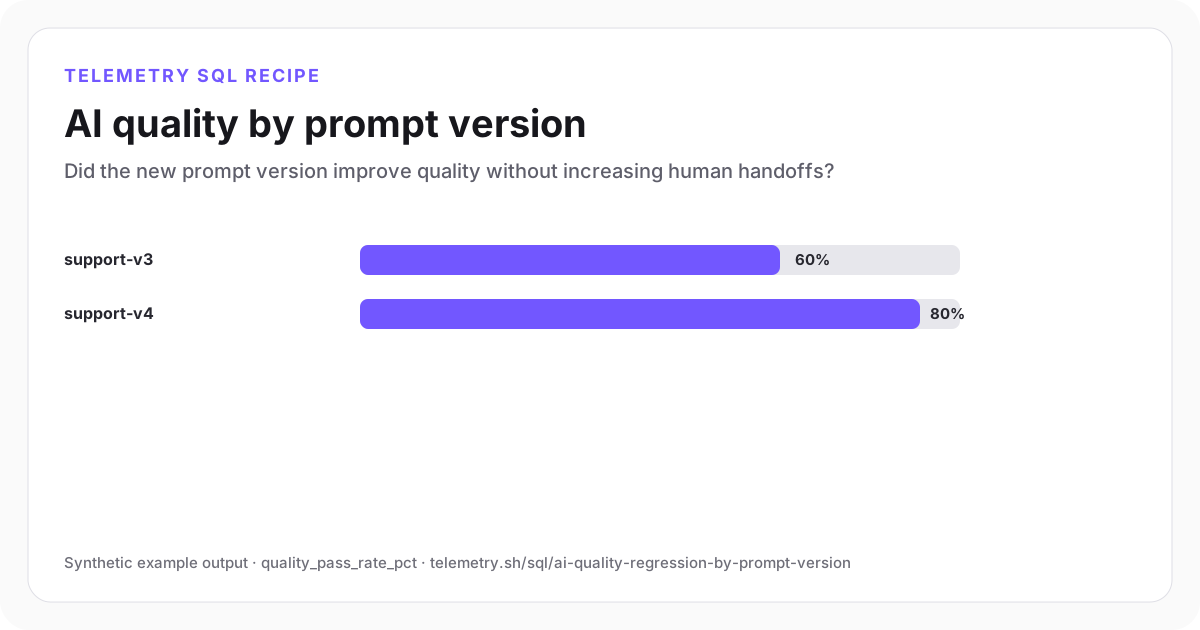
AI quality by prompt version
Version 4 has the higher quality pass and acceptance rates with no observed handoffs.
| workflow_name | prompt_version | evaluated_runs | quality_pass_rate_pct | acceptance_rate_pct | handoff_rate_pct | average_quality_score | cost_per_quality_pass_usd |
|---|---|---|---|---|---|---|---|
| support_reply | support-v3 | 5 | 60 | 60 | 40 | 0.69 | 0.03 |
| support_reply | support-v4 | 5 | 80 | 80 | 0 | 0.83 | 0.03 |
Synthetic example output. Run the query against your own event schema and thresholds before using it for operational decisions.
Reproduce the example
Download the sample data
The JSON bundle includes the event schema with field types, reproducible input rows, exact SQL, expected output, review notes, and engine version. The CSV contains the displayed result.
How the SQL works
- 1Prompt version is an explicit event field, making rollout comparisons reproducible.
- 2Quality pass, product acceptance, and handoff rate show different aspects of usefulness.
- 3Cost is divided by successful quality outcomes rather than raw runs, which prevents cheap failures from looking efficient.
Edge cases to check
- Keep evaluator definitions and thresholds stable across the compared versions.
- Separate offline evaluator scores from real user acceptance instead of treating either as ground truth.
- Segment by task difficulty or customer cohort when prompt versions receive materially different traffic.
Recommended dashboard
- Bars: quality and acceptance rate by prompt_version
- Trend: handoff rate with rollout annotations
- Table: evaluated runs and cost per quality pass
Alert guidance
Alert on a sustained quality or acceptance regression only after the new version reaches a reviewed evaluation volume.
Read alert setupSet up the events this query needs
Related instrumentation and guides
Continue the analysis
Calculate LLM cost by feature and model
Attribute model spend, tokens, request volume, and cost per request to product features.
Open recipeMeasure accepted AI outputs per dollar
Connect model spend to accepted, saved, or otherwise useful product outcomes.
Open recipeMeasure LLM cache savings and retry cost
Compare cached requests, retry volume, and estimated spend by model to find avoidable AI cost.
Open recipeRun it on your events
Create a table, adapt the fields, and save the result
Start free, send structured events, and use the query result as a chart, shared dashboard widget, or alert input.